


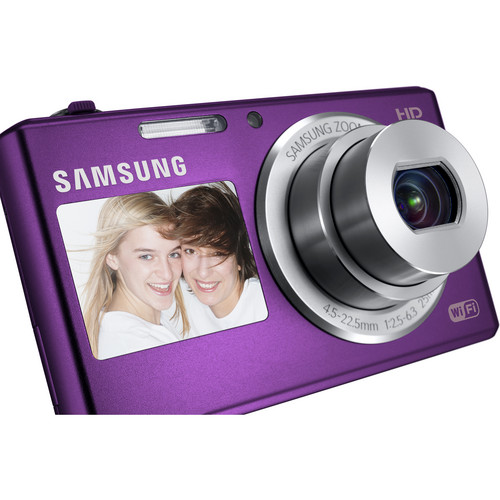
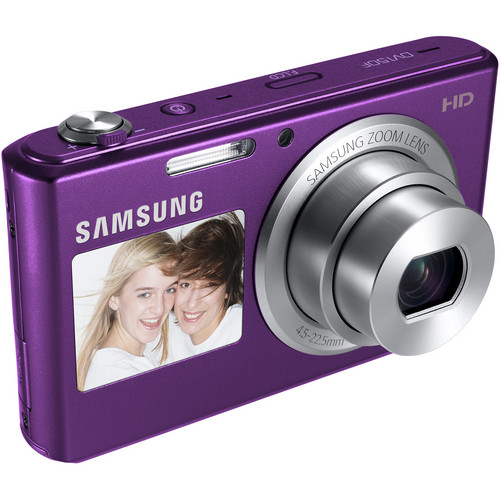

Samsung DV-150F 16.2 MP Digitalcamera

Key Features
- 16.2MP CCD Image Sensor
- 2.7″ 460K-Dot Rear LCD, 1.5″ Front LCD
- 25-125mm 5x Optical Zoom Lens
- Capture HD 720/30p Video

The plum Samsung DV150F Dual-View Smart Digital Camera is a point-and-shoot with a 16.2MP CCD image sensor. It’s equipped with dual LCD monitors: there’s a 2.7″ one in the rear with a resolution of 460K pixels and a Smart 3.0 (5-way) UI, and there’s a 1.5″ one on the front for taking great self-portraits. Choose from Self Shot, Jump Shot and Children’s Mode. The Self Timer’s visual countdown lets you and anyone else in the photo know just when to smile.
The camera’s 5x optical zoom lens has a focal length range of 25-125mm (35mm equivalent), and a fast aperture of f/2.5 for using fast shutter speeds to minimize motion blur and for low-light shooting. Record HD 720p video at 30fps.
Capture sweeping pan shots with 2D Panorama. Smart Auto takes the calculating and guesswork out of photography by automatically selecting the best settings for a given scene. The DV150F also features a Smart Movie mode. Face, Blink and Smile Detection help you snap photos of people at just the right moments.
Smart Camera features include Wi-Fi and email, as well as a dedicated Direct LINK hot key to help you quickly connect to Wi-Fi networks. Download the Samsung Smart Camera App to get Mobile Link, Remote Viewfinder and AutoShare, rather than downloading each individually. Instead of launching the apps one at a time on your smartphone, you can open all three simultaneously with the touch of a finger.
Mobile Link lets you select and send an image or album directly to an Android smartphone, iPhone or tablet; you need not even send the image as a text message or as an email. Make updates to the album on your phone and the changes will be saved to your camera, too.
The Remote Viewfinder function enables you to control your camera by using your smartphone as the viewfinder (available for select smartphones). You can preview images, adjust camera settings, zoom in and out and frame each scene. AutoShare allows you to simultaneously send every picture you take to your mobile phone via Wi-Fi. Just set it up once and the camera saves it as the default setting. AutoShare also GPS tags your photos with your smartphone.
MS Skydrive provides access to the cloud for file sharing and storage. Upload your photos and videos to social media sites like Facebook, Picasa and YouTube, and enjoy easy wireless transfers of photos and videos to your PC or Mac with Auto Backup. Also enjoy AllShare Play, which lets you connect to all devices that support it. Wirelessly stream photos and videos from your camera to nearby devices to share with friends and family at once, or simply upload to web storage instantly for easy management. The camera features Family Story, too, as well as a Software Upgrade notifier.
The DV150F runs on a lithium-ion battery and is equipped with a microSD/microSDHC memory card slot.
TTL Autofocus
Smart Filter, Smart Shooting Modes, and Live Panorama
Smart Filter 3.0
Smart Auto 2.0 for Stills and Movies
Live Panorama
More Shooting Modes
Customize and Edit your Photos
Beauty Palette
Motion Photo
Magic Frame
Additional Features
Sharpness
File Formats
Date Imprinting
System Requirements
Windows XP SP2, Vista or 7
250MB or more hard-disk capacity (over 1GB recommended)
512MB RAM (over 1GB recommended)
nVIDIA Geforce 7600GT or greater or ATI X1600 series or greater graphics processing unit
1024×768 pixels, 16-bit color display compatible monitor (1280×1024 pixels, 32-bit color display recommended)
USB Port
CD-ROM drive
DirectX 9.0c or above
Mac: Power Mac G3 or greater, Mac OS 10.4 or later
Included Software
Related products
-
Photography, Digital Cameras, Mirrorless Cameras
Sony Alpha a7R IV Mirrorless Digital Camera (Body Only)
 Photography, Digital Cameras, Mirrorless Cameras
Sony Alpha a7R IV Mirrorless Digital Camera (Body Only)
Features:
- 61MP Full-Frame Exmor R BSI CMOS Sensor
- BIONZ X Image Processor & Front-End LSI
- 567-Point Phase-Detection AF System
- UHD 4K30p Video with HLG & S-Log3 Gammas
- 5.76m-Dot Tru-Finder OLED EVF
- 3.0″ 1.44m-Dot Tilting Touchscreen LCD
- Up to 10 fps Shooting, ISO 100-32000
- 5-Axis SteadyShot INSIDE Stabilization
- 240MP Pixel Shift Multi Shooting
- Bluetooth & Wi-Fi, Dual UHS-II SD Slots
SKU: ILCE7RM4/B -
Photography, Digital Cameras, DSLR Cameras
Canon 200D DSLR Camera with 18-55mm Lens (Black)
Key Features
- 24.2MP APS-C CMOS Sensor
- DIGIC 7 Image Processor
- 3″ 1.04m-Dot Vari-Angle Touchscreen LCD
- Full HD 1080p Video Recording at 60 fps
With a compact and lightweight body, the black Canon 200D DSLR Camera provides users with a fully-featured system that won’t weigh them down. Packed into the tiny body is a capable 24.2MP APS-C CMOS sensor and a DIGIC 7 Image Processor, both of which work together to create sharp, vivid images at native sensitivities up to ISO 25600
SKU: Canon 200D DSLR -
Photography, Lenses, SLR Lenses
Canon EF-S 10-18mm f/4.5-5.6 IS STM Lens
Key Features
- EF-S-Mount Lens/APS-C Format
- 16-28.8mm (35mm Equivalent)
- Aperture Range: f/4.5 to f/29
- One UD Element & One Aspherical Element
A flexible wide-angle zoom in a compact form factor, the EF-S 10-18mm f/4.5-5.6 IS STM from Canon is a 16-28.8mm equivalent lens designed for EF-S-mount DSLRs. Helping to reduce the overall size while maintaining high optical quality, a four-group zoom design is employed along with one ultra-low dispersion element, one aspherical element
SKU: CANON EF-S 10-18 4.5-5.6 -
Photography, Digital Cameras, Mirrorless Cameras
Sony Alpha a6100 Mirrorless Camera with 16-50mm Lens
 Photography, Digital Cameras, Mirrorless Cameras
Sony Alpha a6100 Mirrorless Camera with 16-50mm Lens
Key Features:
- 24.2MP APS-C Exmor CMOS Sensor
- BIONZ X Image Processor
- UHD 4K30p and Full HD 120p Video
- SVGA Tru-Finder 1.44m-Dot OLED EVF
- 3.0″ 921.6k-Dot 180° Tilting Touchscreen
- Up to 11-fps Shooting, ISO 100-32000
- 4D FOCUS with 425 Phase-Detect Points
- Real-Time Eye AF and Subject Tracking
- Built-In Wi-Fi and Bluetooth
SKU: ILCE6100L/B -
Photography, Tripods & Support, Tripod Accessories, Camera Plates & L-Brackets
Pro-X ХР-ВМ1 / VСТ-14 trіроd аdарtеr ѕіmіlаr tо VСТ-1ВР
 Photography, Tripods & Support, Tripod Accessories, Camera Plates & L-Brackets
Pro-X ХР-ВМ1 / VСТ-14 trіроd аdарtеr ѕіmіlаr tо VСТ-1ВР
Features:
- ѕресіаl аdарtеr рlаtе fоr VСТ-14 trіроd аdарtеr рlаtеѕ
- саn bе соmbіnеd wіth numеrоuѕ саmсоrdеrѕ аnd
 DЅLRѕ
DЅLRѕ - еnаblеѕ thеѕе саmеrаѕ tо bе uѕеd оn рrоfеѕѕіоnаl VСТ-14 аnd VСТ-U14 trіроd рlаtеѕ
SKU: XP-BM1